
Meeting notes that cite their source: timed transcripts, cited summaries and action items you approve
AI meeting notes sound confident and are not always right. Now every line of the transcript carries its time, every decision and action item in the summary cites the moment it was said, and the action items the AI finds become tasks only when you tick them. Plus a Names & terms list for spelling, and a consent record on every recording. On every plan.
The most common complaint about AI meeting notes is not that they are slow or ugly. It is that they are confident. An action item nobody said. A real one dropped. A "we could maybe" written up as a decision. And when you doubt a line, the only check is to replay the whole call.
This release makes the summary something you can verify in one click and act on in one more. The transcript carries the time on every line. The summary cites the moment behind every decision and action item. And the action items the AI finds are offered to you first, with owner and due date, before any of them becomes a task.
Every line of the transcript has a time
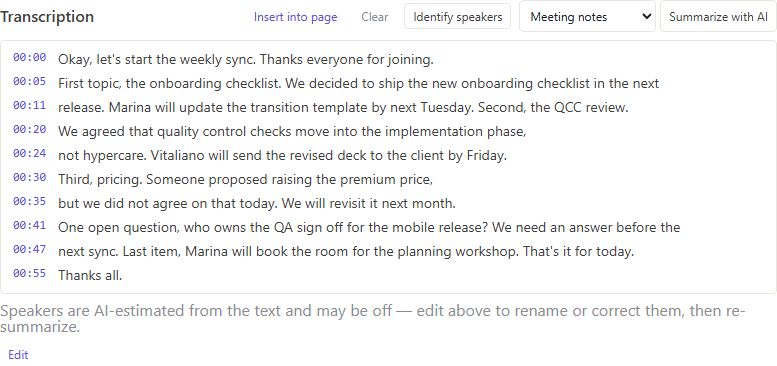
Record a meeting, or import a recording, and the transcript comes back with the moment on each line — 00:05, 00:11, 00:20. Click a time and the audio plays from there. This works for recordings of any length, including the long ones that are transcribed in pieces, and the Identify speakers pass keeps the times in place. An Edit button swaps in the plain text if you want to correct a name or a word.
Decisions and action items cite the moment
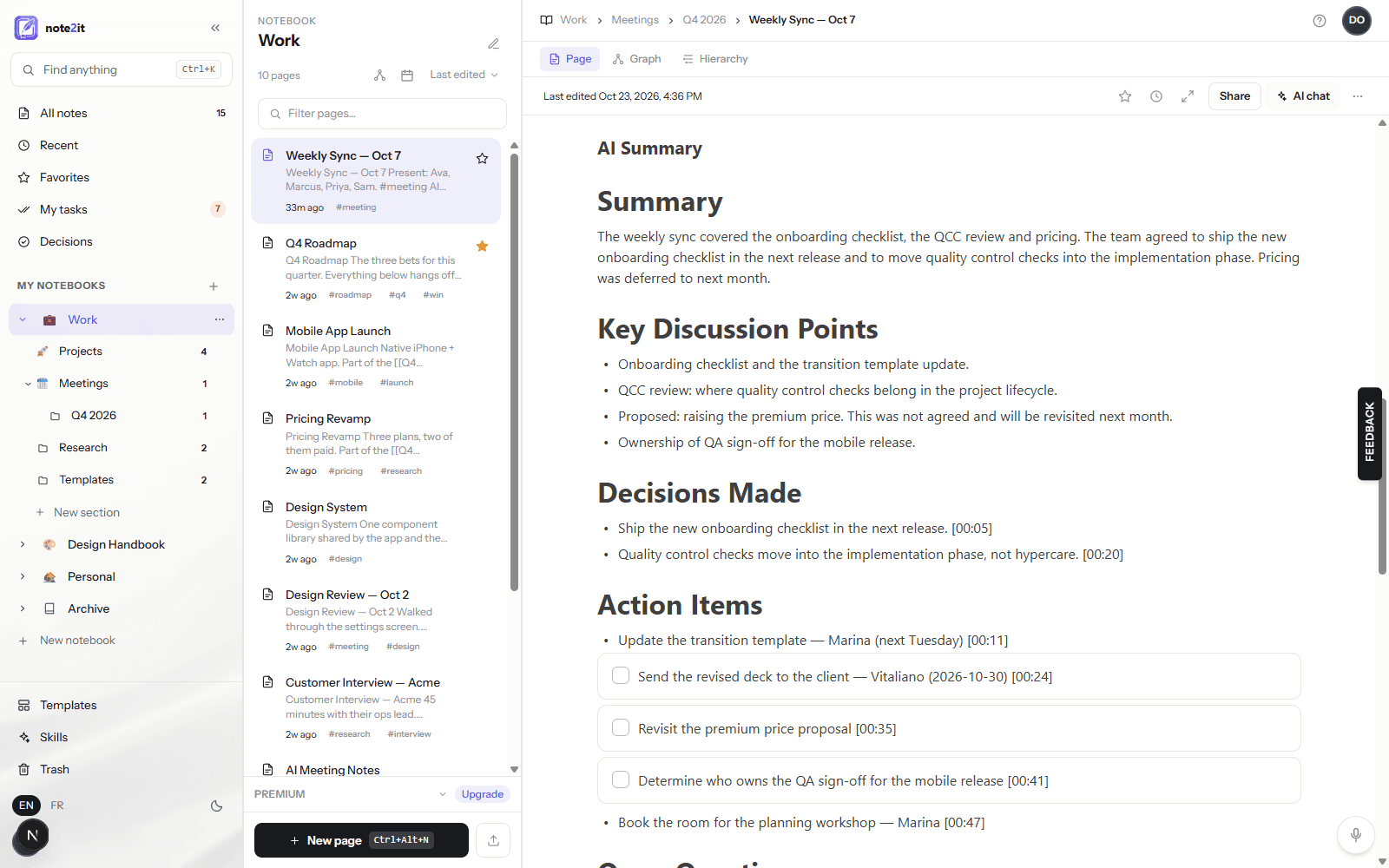
Summarize, and every bullet under Decisions Made and Action Items ends with the time it came from — a link that plays that moment of the recording, in the block and on the page once the summary is inserted. The AI is told to copy the time from the transcript, never to guess one, so a wrong citation is visible the second you click it.
The prompt also draws a line the old summaries blurred: Decisions Made holds only what was explicitly agreed. A suggestion that was floated but not agreed is listed under the discussion points as Proposed, never promoted to a decision. In our test meeting, "someone proposed raising the premium price, but we did not agree on that today" landed exactly there.
Tick the action items you own; they become tasks
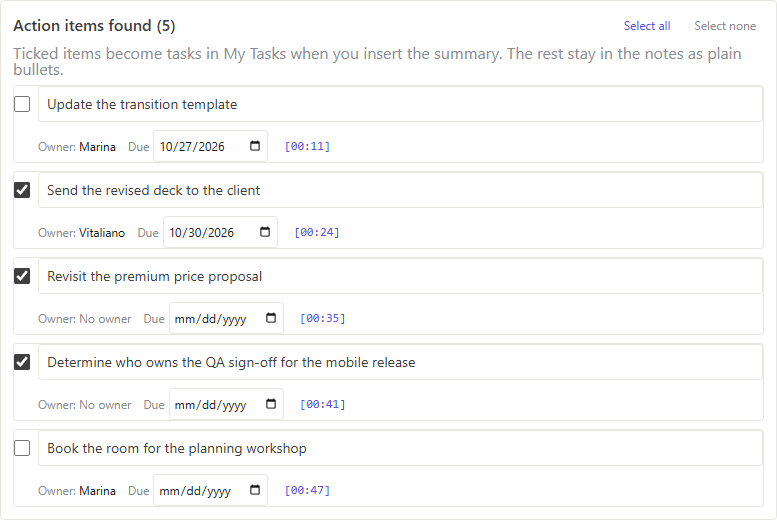
Under the summary, a review card lists the action items the AI found: an editable title, the owner the notes named, a due date (resolved from "next Tuesday" or "Friday" on your calendar), and the time it was said. Items assigned to you are ticked; items assigned to someone else are not. Insert into page, and the ticked items become real checklist items with their due date set in My tasks, while the others stay in the notes as plain bullets. Nothing reaches My tasks without your tick — that is the control against invented action items.
The review is a human-in-the-loop step by design. If the AI found five items and one is wrong, untick it and it stays as text; if a date is off, change it in the card before inserting.
Names & terms, spelled your way
Transcription models mishear names, products and acronyms. In Settings, Names & terms takes a list of yours — people, products, the acronyms your team uses — and every transcription, speaker-labeling pass and summary from then on is asked to spell them exactly. It applies on the web and in the iPhone app alike, because the list lives with your account and is applied on our side.
A consent record on every recording
Recording a meeting has always required you to acknowledge that participants are told and that any legally required consent is yours to obtain. Now the block keeps the time you acknowledged it, and the transcription's entry in your audit log carries the same timestamp, so your record shows when consent was given for each recording. A Copy disclosure button gives you a short notice to paste into the invite or read aloud. Imported recordings say so plainly: no acknowledgment on file.
No bot joins your calls, we do not train models on your notes, and our AI provider does not either. The Trust page has the full picture.
On every plan
Timed transcripts, cited summaries, the review card and the consent record are part of AI meeting notes, which every plan includes — your first 15 meetings are free. Names & terms is in Settings for every account. Open your next recording, summarize it, and click a time.